Posts

Final thoughts and the lesson learned from UI design.
Image
 In this last post related to design, I'm going to talk about what I've actually learned about UI design so far. freedom to concentrate on programming afterwards I personally think that a UI design is a must before starting the construction of an app. It gives me a lot of freedom to concentrate on programming afterwards. First and foremost because you don't have to think about the concept anymore, but also, especially with a prototype in Figma or other software, you know that you will be happy with the result. Without this you can invest a lot of time in a product that you do not yet know if the end result is the result you wanted to achieve. achieve a goal every day Furthermore, during the construction of the UI I learned that you have to work in many small steps.  In this way I achieve a goal every day. And that there is a kind of chronological structure to achieve the end result. A structure that is probably different for everyone. And with which you should feel good. An...
My navigation choice and landing page.

Image
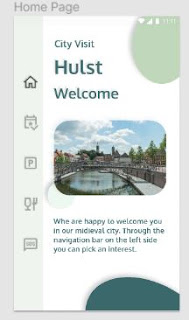
choice of navigation Now that the colors and background are fixed, I have made a choice of navigation. My analysis showed that all information had to be accessible via all screens and very clear. I then opted for a vertical navigation column on the left side of the screen. With Flutter in mind I am talking about a "Navigation Rail". I also find it very pleasant to work with this principle. After asking friends and acquaintances, they thought this choice was quite good in this case. an anomaly in our field of vision From my analysis it follows that I need 5 screens. You can find the analysis here . So in the navigation bar 5 icons. I choose simple icons that fit in with my creative idea. The icons come from the Figma plug-in "icon8" and are square to all other round shapes in the project. this again provides a graphical separation between page and navigation. As a result, when opening the landing page, sooner or later the attention has to go to the icons, because the...

My projects color palet building. 3 steps forward, 2 steps back

Image
 This week was a strange, hard but fantastic week! I have worked all week on my all time first UI design for a mobiel app. A strange set of feelings but i learned so mutch about Figma, my project and myself. Figma was my only tool I used. A complete focus on one tool for one job. The first days it was a dance of 3 steps forward and 2 steps back. Downright frustrating. But fun! split my project From the moment I got the hang of Figma a bit, especially how components work. I got an enlightened moment. Let me split my project into the smallest possible pieces. And just concentrate on that part. That's the big lesson I learned for myself, not only for the project but also for my future career as an app builder. color palet For example, after the analysis I had made, which you can find here , I knew that I wanted to work with a certain color palette. So I focused on the colors. May sound stupid, but it isn't. I studied the colors of the client and poured them into a color palette. W...

My first UI Design is ready for comments

Image
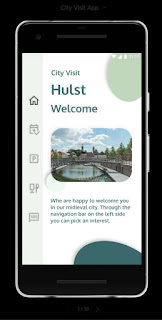
 City Visit App The time has come, my first UI design is ready, I'll get straight to the point. May I introduce you to City Visit App. Sorry for the possibly poor quality of the screenshots. But I don't know how to make a nice presentation for a blog. I had never thought about this before. These are the pages. The detail page The cards The project color palet. The prototyping. In the meantime I also made the prototype in Figma. So all connections are made. Does anyone have an idea how I can make a nice presentation to the customer in Figma? Just let me know. I would like to hear from you, what you think of it in the comments. Do, believe and be happy Stefaan

UI design analysis guideline

Image
And how do you start now?  I am working with Figma but I am not going to write a tutorial about this software.  But I will describe my way of thinking and how I structure my design. Design without a client         To know what I need in a design without a client, I go through all possible lines of thought myself.  As user, client and designer.  I write all this down, and then perform an analysis on my own text.  All parts of the design will emerge from this analysis.  These are techniques that are also used in brainstorming sessions.  I use these techniques in my work every day.  Even to fill in the missing data, in one of my analyzes. You can find the basic idea for the app in last post here The user.   I want a landing page that I will go to when the app opens.  On that landing page I want to navigate to the events .  I also want to know where I can park my car . And after a nice city walk I want to be ...

Structuring your first project. The architecture.

Image
The first step in the right direction.  We are ready! We start on the first project. The first step in the right direction. I think everything stands or falls with a good project structure. Whether programming or building a house. And in my case it is a mobile application. The idea. I am going to build a mobile app that will guide people when visiting the small medieval town where I live. Now you will think, ok there are 13 in a dozen. And yes indeed, but this app, compared to such apps, takes a step back! This must be a low budget basic app, such that every small village can afford this app. So they can promote tourisme after the Corona crisis. But ... the app must be completely scalable and extensible in every possible direction. And all this with a backhand for dummies. So what will we all need And how far have I mastered those building blocks? I will make a small list below, in which half will probably be forgotten or I don't know about it at all. Graphical design. I don't ...

How do you write your first code.

Image
what I want to achieve  How did I start writing code?  The most important thing I actually kept in mind was what I want to achieve.  What do I want to write a mobile app for?  What should that app be able to do?  And what will that app look like. analyzed every line of code and added comments  On YouTube I started looking for videos where apps are programmed, which were in line with what I want to achieve with my own app.  And then I simply started typing the code into my editor.  But I analyzed every line of code and added comments.  And since I chose Flutter, I also looked up every widget used in the flutter documentation.  If this documentation was not enough, I searched YouTube for all possible videos about this widget.  The widget with all its properties. style and systems  In this way I have also noticed that there are several roads leading to Rome and Paris.  And that every programmer has his own style and systems. ...