Posts

Thinking & coding: Studying on FireBase.

Image
This session will be something completely different. I am going to look for a way to load my data into the backend in a simple and fast way. Because if you have to enter all data in Firestore via the console, that won't get you anywhere. In my search through the FireBase documentation, I came across the following. With the resulting problems. My data consists of various text elements, but also a image element. Now no images can be added to the database, according to the documentation. If a image is saved in the backend, this will be done in another FireBase service, Firestore. There you have a 'bucket' where you can dump this image data. So I have to store my photo element 'eventImage' in Firestore and all other 'event ......' elements in the Firebase database. Now there is no information on how to link them both, or I have not found it. At times like this, I am glad that we live with the infinite internet in this day and age. In the past, you could search l...
Thinking & coding: Snappy detail related to TweenAnimationBuilder

Today it is Friday. And what a great programming sessions I had this week. I am very happy with what I have achieved. And especially with the things that I have learned. As every Friday, there are no fundamental things planned in the programming. In addition to cleanup the code, which I do every week on Friday, I've also posted my TODOs for next week. I will probably also have time to write code here or there this weekend. But programming in the weekend is always seen by me as extra time. And that is not planned. What did I do today? What did I do today? I incorporated a few simple animations into the app. The animations are not for show, but rather functional. Although they are beautiful, I think, ....... And like every Friday the code is cleaned up and structured where necessary. Because I work without an appBar, I needed another 'BackButton' in my eventDetailScreen to return to the EventScreen with the EventCard's in the EventList. For that I used a simple FloatingAc...

Thinking & coding: a new screen, EventDetailScreen.

Image
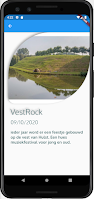
In this programming session I am going to write the 'EventDetailScreen'. It will become a page showing all the info of the chosen event. In the 'EventCard' there is an 'InfoButton'. It is this button that will navigate the user to the detail screen. Lets start the journey. First I create a new Dart file in the project tree, the 'event_detail_screen.dart'. The class in this library will be named 'EventDetailScreen'. Then i largely build the UI of this new screen. That is all a bit of piecing and measuring, but in general, straightforward. The finishing touch will come later. Now its about the data handling. Now that I have some screen layout, I will try to link the data to this EventDetailScreen. My big question is, if I press the info button of an event card in the list of events, how do I get the correct details of the correct event in my detail screen. I'm going to fix the navigation first. When I push the info button, that I can go to the ...

Thinking & coding: Implementing the UI EventCard.

Image
Deploying my EventCard. After the last code session I got the StreamProvider of the Riverpod package up and running. And also be able to display the data from the backend using ListTile Widget, in the ListView.builder . And all this to test whether the code works so far. This includes the FirestoreFirebase service , the EventModel and the StreamProvider . Now I am going to replace the ListTile with the EventCard I wrote earlier. Let's see what problems we will encounter with this action. Normally, all of this should go pretty smoothly. Finally I bring the EventCard in the existing widget tree where the provider makes the data in stock. We will see. First and foremost, I modified the EventCard Widget. When we implement the EventCard, we have to create a possibility to access the variables. So we declare the necessary variables and build a named constructor. Code lines 5 - 17 Then I entered my variables in the UI code. Code lines 42, 49, 72 have been changed and later we will als...

INTERLUDIUM: importance of documenting the code while programming

I would like to give an important tip to all newbies like me. Maybe you ask yourself how can Stefaan give a tip while he is still so new to programming. Well, it comes from the little experience I have gained in the last year. And the many years of experience as an analyst in a think tank. I am a sole proprietor. I am alone. I don't have any colleagues where I can talk to while writing code. So I am my colleague and so I have to consult with myself. And believe me I don't often get my right hahahaha. I've found that by documenting my code, in this case my Blogpost articles, I often find the solution to a problem. And this in my own writings. Time and again, my solutions have partly come from my texts. Of course not the full syntax, but certainly a reference to documentation that I could consult. By writing down what I do. And especially writing down my problems sometimes clarifies the mistakes of my own thinking process. Rereading and rewriting my articles sometimes let the...

Thinking & coding: Turning 180° with the code, a good lesson learned.

In this session I wanted to bring the eventcard into the listview. And then also the data of the backend. After all this I want to clean up the code a bit. I will still need a provider Still, I want to somehow separate the FirestoreService from the UI. I wanted to do this by extracting the widgets in the FirestoreService. But then I will still need a provider, a stream provider. Maybe I will switch to a FutureProvider later. I am not yet sure of that. I want to use Riverpod because I need 2 providers of the same type. I learned a good lesson So this session I learned a good lesson. If I want to separate the UI and the logic or backend I always need stat management. So I have to restore my thinking to the original idea. This will certainly not be the last time I have to overthrow my code to achieve my goal. But don't worry, we're flying back in there. A resume of what I have and should do. I have a Firestore service that reads the events from the backend. In the Firestore servic...

Thinking & coding: Building the UI EventCard to display in the Listview.

Image
This session I'm building a UI part. The "EventCard". There are 2 big reasons why I am now working on a UI part. The first reason is because this part is a logical consequence of the previous session, but also for motivation. Why motivation? The big advantage with UI construction is that you see noticeably strong progress with almost every new program line. Especially with the "hot reload" from Flutter. And you don't have that with the underlying logic code. And maybe this is just me, but I need that view of progress. I can understand that maybe for a seasoned SE this is not that important but for a newbie like me it is. Finally, don't forget that I have study work for almost every line of code. Because I don't want to just write a practice app, but a real production app. So I constantly ask myself whether I am using the correct programming method, and whether it can be more efficient. To start, I create a new folder in the project tree 'screen w...